Introduction
Welcome! These guidelines are designed to help our Works with Home Assistant partners create consistent branding, packaging, and written content that connects with our shared customers, so that devices certified to the Works with Home Assistant program are easily recognizable. By aligning our look and language, we'll ensure our mission has maximum impact.
Home Assistant
Home Assistant is an open source home automation platform that puts local control and privacy first, giving you full control over your data with no cloud required. As one of the Open Home Foundation's core projects, Home Assistant is powered by a global community of users and developers, all working together to ensure the platform is constantly evolving and improving. Home Assistant offers a simple, powerful, and sustainable way to automate your home.
Your Works with Home Assistant certification
The Works with Home Assistant certification is designed to ensure the Home Assistant community can identify which devices provide the best smart home experience within their setup. The program highlights devices that prioritize local, private, and secure operation while advancing sustainability within the smart home.
If your device or product has an active, formal certificate under the Works with Home Assistant program, you can access the “Works with” badge via the Download Center and use it for that device’s product packaging or website listing.
Download Center
Need files? All badges and logos are available for download.
The Works with Home Assistant badge
Color variations
Colored version on light grey background
When in doubt, use this, as it is the default and official version. Prioritize this version in all brand collateral.
Colored version on white background
Colored version on white background – only to be used on dark backgrounds, for example on a page with a dark theme.

Monochrome on light and dark background
Use the fully black or fully white version on photographic backgrounds to ensure good readability, or in printed materials where color is unavailable.

Incorrect use
- Do not use the badge on the actual device or any Printed Circuit Boards (PCBs).
- Do not use the badge in any material for a device which does not have the Works with Home Assistant certification.
- Do not use the badge if your device no longer has an active, formal certificate for the Works with Home Assistant program.
What to avoid
- Do not add drop shadow.
- Do not distort or rotate the badge in any way. Do not change the dimensions or move any badge element.
- Do not change letter spacing.
- Do not place the logo against any background that doesn't create contrast.
- Do not change the original solid color with an outline, or add any kind of gradient. Use only the selected color palette.
Some older versions of the badge are now deprecated and should not be used. Please only use the current, approved files in the Download Center.
How to use the Home Assistant brand
Color variations
Colored version on light background
When in doubt, use this, as it is the default and official version. Prioritize this version in all brand collateral.
Colored version on dark background
Only to be used on dark backgrounds, for example on a page with a dark theme.
Monochrome on light and dark background
Use the fully black or fully white version on photographic backgrounds to ensure good readability, or in printed materials where color is unavailable.
Incorrect use
- Do not use the logo in the place of the Works with badge. The badge should always be the default way to show compatibility unless the format is completely incompatible.
- Do not use the logo on device packaging.
- Do not use the logo if your device no longer has an active, formal certificate for the Works with Home Assistant program.
What to avoid
- Do not add drop shadow.
- Do not distort or rotate the logo in any way. Do not change the dimensions or move any logo element.
- Do not change letter spacing.
- Do not place the logo against any background that doesn't create contrast.
- Do not change the original solid color with an outline, or add any kind of gradient. Use only the selected color palette.
Some older versions of the Home Assistant logo are now deprecated and should not be used. Please only use the current, approved files in the Download Center.
Using the Home Assistant name
If devices have been formally certified, you are welcome to reference this in written copy on marketing materials. Please ensure the wording states that the device is “certified” under the Works with Home Assistant program, or simply “Works with Home Assistant”.
Always include information on how the device connects, for example if it works locally via Matter, Zigbee, Z-Wave, Bluetooth, WiFi, or via ESPHome, so users understand if they need additional hardware.
Approved examples:
- “Certified by the Works with Home Assistant program”
- “Works with Home Assistant (via Matter etc.)”
Prohibited phrasing:
- “This product is approved by Home Assistant”
- “Recommended by Home Assistant”
- “Home Assistant product”
Co-branding and packaging
For certified products only, you're welcome to use the Works with Home Assistant badge on your product packaging, exhibition marketing, brochures, website listings, and Amazon pages. You are also welcome to provide it to distributors of your certified product.
It is common for the Works with Home Assistant badge to be used alongside the badges of other smart home “works with” programs. When pairing the Works with Home Assistant badge with other badges and logos, the badge should be proportionally sized, balanced in both width and height, and centered visually.
Ensure the badge has ample clearspace around it — at least equal to the height of the logotype or logomark — to give it room to breathe.
Do not change the Works with Home Assistant color palette to match other smart home “works with” badges or logos. Only use the color variations provided in these guidelines.
Examples
These images show what co-branding should look like in real contexts, such as on marketing assets or packaging.
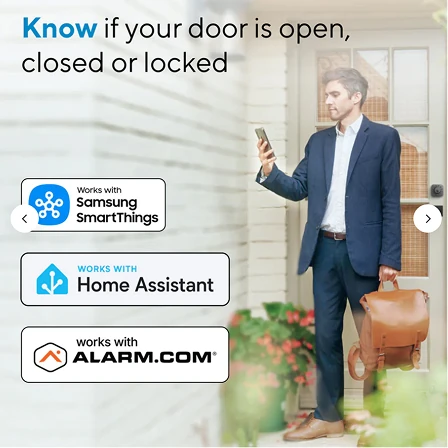
Online/digital use
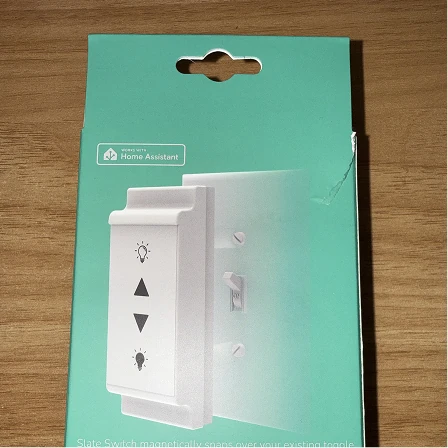
Use on packaging
Communicating device functionality and limitations
In line with one of the Open Home Foundation's three core principles of providing users with choice, being transparent with Home Assistant users about device limitations is a priority.
Planning your Works with Home Assistant launch
All copy announcing your device(s) Works with Home Assistant certification must be reviewed by the Works with Home Assistant team before it can be shared publicly. This includes copy intended for websites, social media, newsletters, blogs, or packaging.
The Works with Home Assistant team will also share copy relating to your device(s) with you during launch planning to ensure consistency.
Informing customers before purchase
Partners are expected to clearly communicate functionality limitations to potential buyers - anywhere the device is listed along with the Works with Home Assistant badge or Home Assistant logo - before purchase is made.
Wording about the limitation must be specific, and clearly explain what it means for the customer.
Here are two approved examples:
- “This device requires a Home Assistant-compatible Zigbee coordinator to connect (sold separately).”
- “This device supports on/off control via Home Assistant, but dimming is not currently supported.”
Should your device no longer be certified by the Works with Home Assistant program, please remove all badges, logos and references to the program immediately.
Need help?
Thank you for your commitment to our mission. By using these guidelines you’re helping build trusted, consistent, and recognizable brands for our entire community, as well as people who are new to open smart homes.
Have questions? Please contact us directly: [email protected]